10 分钟把 LangChain 里的 Model 用明白:不懂原理也能跑起来,懂了还能玩出花。
看完本篇文章后,你会了解:
- Model 的基础用法:独立使用 / 搭配 Agent,并使用流式/非流式/批量调用模型
- 如何使用模型的 Tool Calling 功能
- 如何让模型返回结构化的输出
- 以及更多高阶应用:多模态、思考/非思考、限流等等
也欢迎你收藏本篇文章,以便后续查询时使用
LangChain 中的 Model
LangChain 中的 Model,主要使用大语言模型,它能够像人类一样理解并生成文本,具备强大的文档撰写、翻译、总结等能力。
除此之外,许多模型还支持:
- 工具调用:调用外部工具(如网络搜索、API 调用)并把结果用于回答
- 结构化输出:模型可以返回结构化的数据,如 JSON、XML 等,而不是普通的文本
- 多模态:支持处理文本、图像、音频、视频等多种模态数据
- 深度思考:模型可以进行深度思考,应对更复杂的任务,如多轮对话、复杂的问题求解等
模型的基础用法
以 DeepSeek 为例,展示模型的基础用法,当然你也可以根据你的需求,选择其他模型。
from langchain.chat_models import init_chat_model
# 初始化一个模型
model = init_chat_model(model="deepseek-chat", # 模型名称
                        base_url="http://10.0.41.5:8000/v1/", # 模型的 API 地址,不填则默认为官方地址,也可以填写自定义的地址
                        api_key="sk-xxx", # 模型的 API 密钥
                        model_provider="deepseek",  # 模型的供应商
                        max_tokens=1024, # 模型的最大输出 token 数
                        top_p=0.95, # 模型的 top_p 参数,用于控制生成文本的多样性
                        temperature = 0.3, # 模型的温度参数,用于控制生成文本的随机性
                        extra_body={"thinking": {"type": "enabled"}} # 模型的额外参数,用于控制生成文本的行为
                        )
response = model.invoke("你好,请介绍你一下你自己,你是哪个模型,用一个词回答我?")
print(f"模型回答内容:{response.content}")
# 模型回答内容:DeepSeek
多轮对话场景下
conversation = [
    SystemMessage("You are a helpful assistant that translates English to Chinese."),
    HumanMessage("Translate: I love programming."),
    AIMessage("我爱编程"),
    HumanMessage("I love building applications.")
]

response = model.invoke(conversation)
print(f"模型回答:{response.content}")
# 模型回答:我喜欢开发应用程序。
流式调用
流式调用是指模型在生成文本时,以流的形式返回结果,而不是一次性返回完整的文本。
这在处理长文本或实时应用场景下非常有用,因为它可以及时地将生成的内容展示给用户,而不是等待模型完成整个生成过程。
流式调用的示例如下:
content_chunk = None
for chunk in model.stream("天是什么颜色的?"):
    for block in chunk.content_blocks:
        if block["type"] == "text":
            content_chunk = block["text"] if content_chunk is None else content_chunk + block["text"]
            print(content_chunk)
print("===========================final result===========================")
print(f"Content: {content_chunk}")
# 这是一个
# 这是一个看似
# 这是一个看似简单却
# 这是一个看似简单却非常
# 这是一个看似简单却非常有趣的问题!
你可以看到,流式调用的输出是一个字符一个字符地出来的,而不是一次性返回完整的文本,这极大的提升了用户体验。
批量调用
批量调用是指模型在一次调用中处理多个输入,而不是逐个处理。
# 你可以一次性提交多个问题,模型会并行处理它们
responses = model.batch([
    "为什么鹦鹉的羽毛有很多颜色?",
    "为什么飞机会飞?",
    "什么是量子计算?"
])

for response in responses:
    print(response.content)
为了不对模型造成过大压力,你可以设置 max_concurrency 参数来限制并发调用的数量。
responses = model.batch([
    "为什么鹦鹉的羽毛有很多颜色?",
    "为什么飞机会飞?",
    "什么是量子计算?"
], config={
    'max_concurrency': 3,
})
当提交的问题数量超过 max_concurrency 时,模型会按照 max_concurrency 的数量并行处理,而其他问题则会等待。
在处理三个问题时,并发数量分别为 1、2、3 调用计时如下:
 1 个并发下的总耗时:42721 ms
 2 个并发下的总耗时:30586 ms
 3 个并发下的总耗时:21686 ms
Tool Calling
工具调用是指模型在生成文本时,调用外部工具(如网络搜索、API 调用)并把结果用于回答。
这在需要模型具备一定的外部知识或能力时非常有用,例如回答需要实时数据或执行复杂计算的问题。
# 定义一个工具
@tool
def get_datetime() -> str:
    """获取当前时间。"""
    return datetime.now().strftime("%Y-%m-%d %H:%M:%S")

# 1. 用户的问题
messages = [HumanMessage(content="现在是几点?")]

# 1.1 调用大模型,让模型决定是否调用工具
tool_response = model.invoke(messages)

# 1.2 把模型返回的结果放在 conversation 里面
messages.append(tool_response)

for tool_call in tool_response.tool_calls:
    tool_call_message = get_datetime.invoke(tool_call)
    # 2 调用工具
    print(f"tool call message:{tool_call_message}")
    # 2.1 把工具调用的结果放在 conversation 里面
    messages.append(tool_call_message)

print(messages)

# 3 再次调用大模型
final_response = model.invoke(messages)
print(f"最终结果是:{final_response.content}")
关于每一次 Tool Call 的处理流程中,消息的变化如下:
.svg)
| 状态 | 触发动作 | 消息数量 | 关键内容 |
|---|---|---|---|
| S1 | 用户输入 | 1 | HumanMessage: "现在是几点?" |
| S2 | 第一次模型调用 | 2 | AIMessage: 识别需要工具 |
| S3 | 执行工具调用 | 3 | ToolMessage: 返回时间数据 |
| S4 | 最终模型回答 | 1 | AIMessage: 最终自然语言回答 |
相信看了上面这段描述,基本就可以理解工具调用的整个流程了
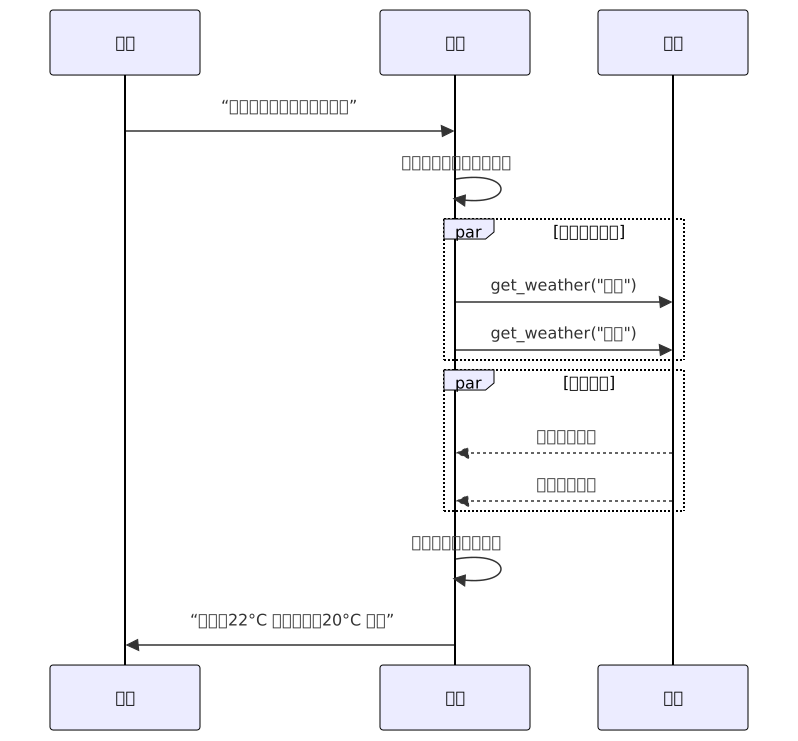
并行调用
并行调用是指模型在一次调用中同时处理多个工具调用,而不是逐个处理。
这在需要同时调用多个工具时非常有用,例如同时获取多个城市的天气。
## 定义两个模型
@tool
def get_datetime() -> str:
    """获取当前时间。"""
    return datetime.now().strftime("%Y-%m-%d %H:%M:%S")

@tool
def get_weather(city: str) -> str:
    """获取指定城市的天气。"""
    return f"{city}今天的天气是晴天,室温 25摄氏度,非常舒适!"
# 1. 用户的问题
messages = [HumanMessage(content="今天是几号?北京天气怎么样?")]

# 1.1 调用大模型
tool_response = model.invoke(messages)

# 1.2 把模型返回的结果放在 conversation 里面
messages.append(tool_response)

for tool_call in tool_response.tool_calls:
    tool_call_message = None
    if tool_call['name'] == 'get_weather':
        tool_call_message = get_weather.invoke(tool_call)
    elif tool_call['name'] == 'get_datetime':
        tool_call_message = get_datetime.invoke(tool_call)
    # 2 调用工具
    print(f"tool call message:{tool_call_message}")
    # 2.1 把工具调用的结果放在 conversation 里面
    if tool_call_message:
        messages.append(tool_call_message)
print(messages)

# 3 再次调用大模型
final_response = model.invoke(messages)
print(f"最终结果是:{final_response.content}")

# 调用的结果,可以看到模型分别查了今天的时间和北京的天气
# **今天是:2025年12月25日 星期四**

# **北京天气情况:**
# - 天气:晴天 ☀️
# - 温度:25摄氏度
# - 体感:非常舒适

# 今天北京天气很好,阳光明媚,温度适宜,是个出门活动的好日子!
结构化输出
模型可以指定按照自定义的 Python 数据结构或 Json 结构来返回结果
这在进行逻辑处理、数据解析等场景非常有用。
Python 数据结构
# 定义数据结构
class Movie(BaseModel):
    """A movie with details."""
    title: str = Field(..., description="电影名字")
    year: int = Field(..., description="电影上映年份")
    director: str = Field(..., description="电影导演")
    rating: float = Field(..., description="电影的评分,从 1-10")

model_with_structure = model.with_structured_output(Movie)
response = model_with_structure.invoke("告诉我电影盗梦空间的一些详情")
print(response)
# 模型输出:Movie(title="Inception", year=2010, director="Christopher Nolan", rating=8.8)
Json 结构
你可以通过定义一个 json_schema 来指定模型返回的 Json 结构
补充:json_schema 是一个 Json 格式的对象,用于描述 Json 数据的结构。 你可以在 Json Schema 官方文档 中了解更多关于 json_schema 的详细信息。
json_schema = {
    "title": "Movie",
    "description": "A movie with details",
    "type": "object",
    "properties": {
        "title": {
            "type": "string",
            "description": "电影名字"
        },
        "year": {
            "type": "integer",
            "description": "电影上映年份"
        },
        "director": {
            "type": "string",
            "description": "电影导演"
        },
        "rating": {
            "type": "number",
            "description": "电影的评分,从 1-10"
        }
    },
    "required": ["title", "year", "director", "rating"]
}

model_with_structure = model.with_structured_output(
    json_schema,
    method="json_schema",
)

response = model_with_structure.invoke("告诉我电影盗梦空间的一些详情")
print(response)
# 输出结果:{'title': '盗梦空间', 'year': 2010, 'director': '克里斯托弗·诺兰', 'rating': 8.8}
多模态
模型可以同时处理文本、图像、语音等多模态数据,实现更复杂的任务。
我们先加载一张 google 的 logo 图片,然后让模型识别这张图片。

with open("google.png", "rb") as logo:
    # 读取 google.png 并转换为 base64
    logo_base64 = base64.b64encode(logo.read()).decode("utf-8")
    message = [
        {"role": "user", "content": [
            {"type": "text", "text": "这是什么 logo?"},
            # 我们可以把图片转换为 base64 编码,然后放在 message 里面
            {"type": "image_url", "image_url": {"url": f"data:image/png;base64,{logo_base64}"}}
            # 也可以使用图片的 url 来表示图片,但需要注意的是,图片的 url 必须是公开可访问的,否则模型无法识别
            # {"type": "image_url", "image_url": {"url": "https://hx-zsy.oss-cn-chengdu.aliyuncs.com/img/google.png"}}
        ]}
    ]

    print(message)
    response = model.invoke(message)
    print(response)
    # 模型输出:这是 **Google(谷歌)** 的官方标志(Logo)。
思维链
有些模型如 DeepSeek-R1 等支持思维链(Chain of Thought)功能,即模型可以根据用户的问题,一步一步地思考并回答。
from langchain.chat_models import init_chat_model

model = init_chat_model(model="deepseek-reasoner",
                        api_base="http://10.0.41.2:8080/v1/",
                        api_key="sk-xxxxx",
                        model_provider="deepseek",
                        # DeepSeek 官方开启思维链功能
                        extra_body={"reasoning": {"enabled": True}},
                        # 本地部署的 DeepSeek 开启思维链功能
                        # extra_body={"chat_template_kwargs": {"thinking": True}},
                        temperature=0.6)

response = model.invoke("天是什么颜色的?")

print(f"模型思考内容:{response.additional_kwargs.get('reasoning_content')}")
print(f"====================思考结束=====================")
print(f"模型回答内容:{response.content}")
# 模型思考内容:好的,用户问“天是什么颜色的?”,看起来是个简单的问题,但得仔细想想背后的意图。……
# ====================思考结束=====================
# 模型回答内容:这是一个看似简单却非常有趣的问题!……

# 以及流式处理
reason_chunk = None
content_chunk = None
for chunk in model.stream("天是什么颜色的?"):
    for block in chunk.content_blocks:
        if block["type"] == "reasoning" and (reasoning := block.get("reasoning")):
            reason_chunk = block.get("reasoning") if reason_chunk is None else reason_chunk + block.get("reasoning")
            print(f"Reasoning: {reason_chunk}")
        elif block["type"] == "text":
            content_chunk = block["text"] if content_chunk is None else content_chunk + block["text"]
            print(content_chunk)
print("===========================final result===========================")
print(f"Reasoning: {reason_chunk}")
print(f"Content: {content_chunk}")
服务端 Tool Call
有一些模型原生支持了服务端的工具调用,模型可以在一个对话轮次里执行网页搜索、调用外部 API 等操作,并分析结果。
比如你可以直接再 chatgpt 里使用 web_search 工具来搜索今天的新闻。
from langchain.chat_models import init_chat_model

model = init_chat_model("gpt-4.1-mini")

tool = {"type": "web_search"}
model_with_tools = model.bind_tools([tool])

response = model_with_tools.invoke("今天有哪些 NBA 新闻?")
response.content_blocks
当然后续在制作智能体时,我们也可以内置一些工具,来供外部直接使用。
限流
为了避免超过模型的限流阈值,我们可以在初始化模型时,提供一个 rate_limiter 参数,来控制请求的速率。
from langchain_core.rate_limiters import InMemoryRateLimiter

rate_limiter = InMemoryRateLimiter(
    requests_per_second=0.1,  # 每 10 秒最多 1 个请求
    check_every_n_seconds=0.1,  # 每 100ms 检查一次是否允许请求
    max_bucket_size=10,  # 控制最大突发请求数量(即“令牌桶”中允许的最大瞬时请求峰值)。
)

model = init_chat_model(
    model="gpt-5",
    model_provider="openai",
    rate_limiter=rate_limiter
)
用量统计
利用 callback 可以方便地统计模型的用量
from langchain.chat_models import init_chat_model
from langchain_core.callbacks import UsageMetadataCallbackHandler

model_1 = init_chat_model(model="deepseek-chat", # 模型名称
                        base_url="http://10.0.41.2:8000/v1/",
                        model_provider="openai")
model_2  = init_chat_model(model="glm-4.7", # 模型名称
                        base_url="http://10.0.41.5:8000/v1/",
                        model_provider="openai")

callback = UsageMetadataCallbackHandler()
result_1 = model_1.invoke("Hello", config={"callbacks": [callback]})
result_2 = model_2.invoke("Hello", config={"callbacks": [callback]})

print(f"deepseek-chat 用量:{callback.usage_metadata.get("deepseek-chat")}")
print(f"glm-4.7 用量:{callback.usage_metadata.get("glm-4.7")}")

# 输出结果
# deepseek-chat 用量:{'input_tokens': 5, 'output_tokens': 60, 'total_tokens': 65, 'input_token_details': {}, 'output_token_details': {}}
# glm-4.7 用量:{'input_tokens': 6, 'output_tokens': 236, 'total_tokens': 242, 'input_token_details': {}, 'output_token_details': {}}
运行时配置
在调用模型时,我们可以通过传递一些额外参数来传递一些运行时的配置,如用户id、会话id等。
这些动态的配置通常在会话追踪、监控、日志记录等场景中非常有用。
response = model.invoke(
    "帮我查一下我还有多少天假期",
    config={
        "run_name": "joke_generation",      # 此次运行的自定义名称
        "tags": ["humor", "demo"],          # 用于分类的标签
        "metadata": {"user_id": "123"},     # 自定义元数据
        "callbacks": [my_callback_handler], # 回调处理器
    }
)
运行时模型配置
做过大模型开发的同学可能会知道,在调用模型时,我们可以通过传递一些额外参数来传递一些运行时的配置,如模型的温度、top_p 等。
我们可以在调用模型时,动态声明这些参数,如:
from langchain.chat_models import init_chat_model

model = init_chat_model(model="deepseek-chat", # 模型名称
                        base_url="http://10.0.41.2:8000/v1/",
                        # 允许修改的参数
                        configurable_fields=("model", "model_provider", "temperature", "max_tokens"),
                        model_provider="openai")


response = model.invoke(
    "请介绍一下你自己",
    config={"configurable": {"max_tokens": "10"}},
)
print(f"completion_tokens: {response.response_metadata.get("token_usage").get("completion_tokens")}, content: {response.content}")

response = model.invoke(
    "请介绍一下你自己",
    config={"configurable": {"max_tokens": "1"}},
)
print(f"completion_tokens: {response.response_metadata.get("token_usage").get("completion_tokens")}, content: {response.content}")

# 输出结果
# completion_tokens: 10, content: 你好!我是DeepSeek,由深度求
# completion_tokens: 1, content: 你好
总结
一口气学完,你会发现 LangChain 的 Model 层就像“万能插座”:
- 基础调用、流式/批量、多轮对话,三行代码就能跑;
- Tool Calling 让模型“长出手脚”,能查天气、调 API;
- 结构化输出直接变 Python 对象,省去正则拆 JSON 的噩梦;
- 多模态、思维链、限流、用量统计、运行时改参……全是 LangChain 帮你封装好的“外挂”。
把收藏本篇文章以及代码片段,下次再碰到“模型怎么用”的问题,复制粘贴改两行,10 分钟上线,剩下的时间安心喝咖啡。祝你玩得开心,Prompt 越写越短,效果越跑越猛!